QR Code Menu for Hotels
Updated November 1, 2026
A QR code menu for hotels gives every guest your menus on their own phone, in their own language. You keep one digital menu for breakfast, restaurant, bar and room service, and update it in one place.
Why a QR code menu suits a hotel
- Guests come from many countries. A printed menu in one or two languages leaves many of them guessing. A digital menu can show the same dishes in the language each guest reads.
- One menu covers every outlet. Breakfast, the restaurant, the bar, the pool and room service can all sit in one menu, sorted into categories.
- Changes reach every table and room at once. Change a price or take a dish off, and the menu on every guest phone is current. Nothing to reprint.
- Guests with allergies can check a dish before they order. Allergen and dietary labels are part of the dish, in the guest language.
How a hotel QR code menu works with MenuHatch
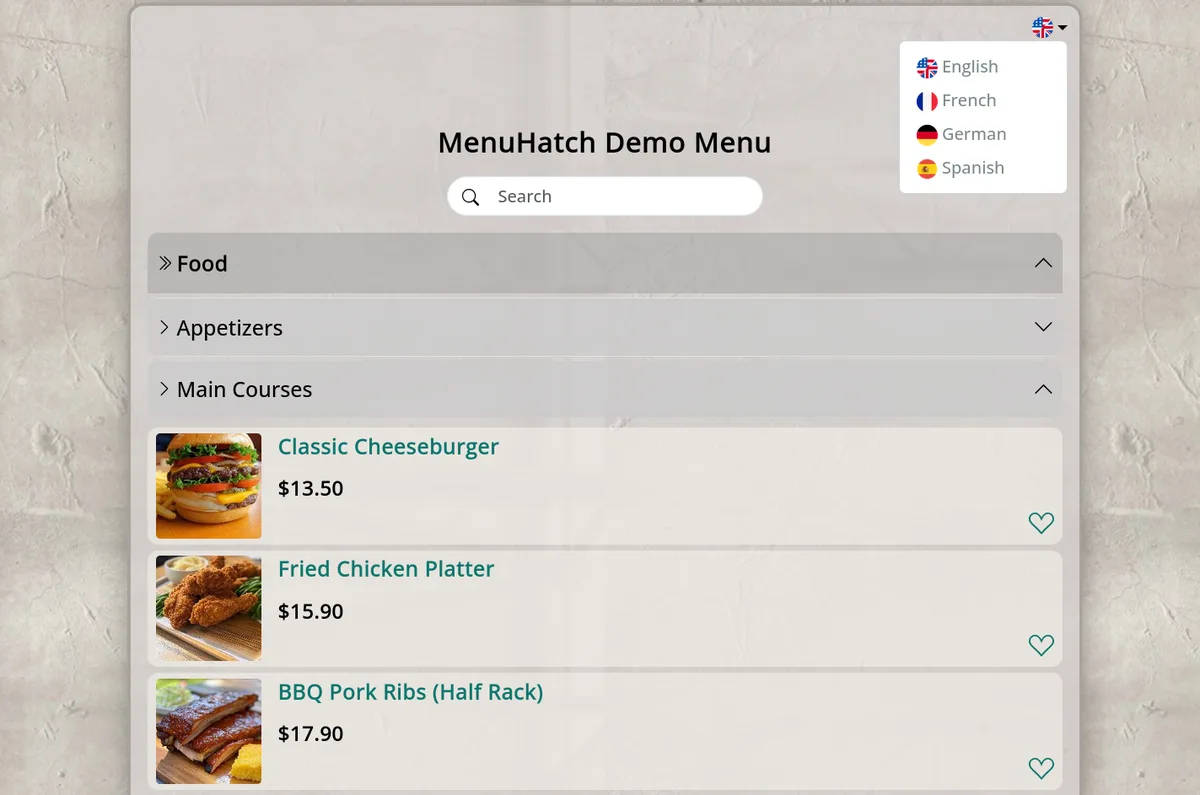
- Build the menu in your main language. Add your dishes with names, descriptions, prices and, if you like, photos.
- Use categories for your outlets. Create categories such as Breakfast, Restaurant, Bar and Room Service, and subcategories below them. A dish can belong to more than one category, so a coffee can appear under Breakfast and under Bar.
- Add your guest languages. MenuHatch offers 20, and AI translates the menu for you. How many extra languages you can add depends on your plan.
- Print the QR code and place it. Guests scan it with the phone camera, choose their language and read the menu. No app, no download.
Start with one outlet, such as breakfast, and add the others once it runs. Guests see the same menu structure everywhere, so they learn it at breakfast and use it at the bar.
Languages for international hotel guests
Each language has its own web address, so a guest can open the menu in their language and share the link with their travel companions. The menu title, dish names, descriptions and price labels such as "glass" and "bottle" are translated. The amounts stay as you entered them.
Some names should stay as written, such as the name of your signature cocktail. Every dish has switches to turn translation off for its title, description or price label. Read more in our guide to a multilingual restaurant menu.
Allergens and dietary labels
Hotel guests often ask about ingredients, and the answer has to be clear in a language they read. Mark each dish with allergens, additives and characteristics such as vegan, halal or gluten-free. Guests see the labels in the dish details, in their language. Rules for allergen information differ from country to country, so check what applies to your hotel. The guide to allergen information on a menu explains the three label types.
Where to place the QR code in a hotel
- Breakfast room: on the buffet and on the tables.
- Restaurant and bar: a card on every table and on the bar counter.
- Rooms: on the desk or the bedside table, for room service and the minibar list.
- Pool and terrace: on a small stand next to the loungers.
- Lobby and reception: next to the information stand, for guests who ask what is on offer.
The dashboard creates a PDF of the QR code in the size you choose, in centimeters, with several copies per sheet. Print it, cut it and place it. The steps are in our guide on how to create a QR code menu.
Common questions
Do hotel guests need an app?
No. The phone camera opens the menu in the browser.
Can guests order through the menu?
The menu shows dishes, prices and details. Orders are taken by your staff as usual.
Do I have to reprint the QR code when the menu changes?
No. The code points to the menu page, so a changed price or a new dish shows up without reprinting.
Can I hide a category I do not offer all year?
Yes. Each category has an active switch. Turn it off and the category disappears from the menu.
Create your hotel QR code menu with MenuHatch
Build your menu, add your guest languages and print the QR code. Start with a free trial, no commitment.
Start free trial See pricing